
Vehicle Owner Details – RTO Vehicle Information 2026
Vehicle Owner Details is a convenient platform for checking vehicle registration and driving licence information in India. It helps users access important vehicle records through government-authorized sources, making it easier to verify registration details quickly and reliably.
In India, vehicle owner details are linked to a vehicle’s registration number and are maintained through the Ministry of Road Transport and Highways (MoRTH) and its Parivahan system. Depending on the information available, a vehicle record may include details such as the registered owner, vehicle make and model, registration date, fuel type, insurance status, and the concerned Regional Transport Office (RTO).
Checking these details can be useful when verifying a vehicle’s registration, confirming basic vehicle information, or checking records before buying a used vehicle. Using official sources helps ensure that the information you receive is accurate and up to date.
Check Vehicle Owner (RC) Details
Vehicle Related Services
Vehicle Registration Services make it easier to manage important vehicle-related tasks online. Depending on the service you need, you can register a new vehicle, check the status of an application, apply for a duplicate RC, update your address, transfer vehicle ownership, manage hypothecation details, and access other registration-related services.
Vehicle Registration is an informational platform designed to help people understand and navigate vehicle-related services in India. We provide simple, easy-to-understand guides covering topics such as Vehicle Owner Details, RTO services, vehicle registration, driving licence information, and other useful vehicle documentation.
Our goal is to make complicated procedures easier to understand so visitors can quickly find the information they need. We aim to keep our content accurate and up to date; however, the information provided on this website is for general guidance only. For official records, legal matters, or administrative decisions, users should always confirm the details with the relevant government department or authorized RTO.
Process to Get Vehicle Owner Details
If you want to check a vehicle’s registration or RC details in India, you can use several government-supported methods. The most common options are the VAHAN National Register portal, the NextGen mParivahan app, and the available SMS service.
Through the VAHAN National Register Portal
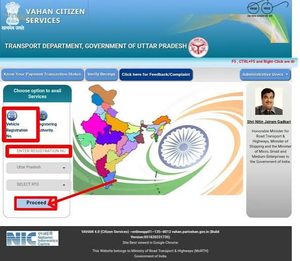
The VAHAN portal allows users to access vehicle registration information and other related services online.
- Visit the official VAHAN National Register e-Services portal.
- Select “Know Your Vehicle Details” from the available services.
- Enter your mobile number and the verification code, then select Next.
- If you do not already have an account, select Create Account and complete the registration process.
Note: Use an active mobile number because an OTP may be sent to it during account registration or verification.
- On the new-user registration page, enter your mobile number and email address.
- Enter the verification code and select Generate OTP.
- Enter your name, create a password, and select Save.
- Once registration is complete, sign in to your account.
- Open the vehicle/RC search option and enter your vehicle registration number along with the required verification code.
- Submit the details to view the available registration information.
Tip: Double-check the registration number before submitting it. Even a small typing mistake can prevent the system from finding the correct vehicle record.
Depending on the information available through the service, you may be able to view details such as the RTO, registration date, vehicle make and model, insurance information, fitness status, and other registration-related records.
Through the NextGen mParivahan App
The NextGen mParivahan app provides another convenient way to access vehicle-related information from a mobile device.
- Download the official mParivahan app from the Google Play Store or Apple App Store.
- Sign in to your account.
- Open Informational Services.
- Select RC Search.
- Enter the vehicle registration number shown on the number plate.
- Tap Search to view the available vehicle information.
The information displayed may include the vehicle’s registration details and other records available through the government system.
The mParivahan app can also be used to access digital versions of documents such as the Registration Certificate (RC) and Driving Licence (DL). These digital documents can also be stored through DigiLocker for convenient access when needed.
Through SMS Service
In some cases, vehicle-related information can also be requested through the government’s SMS service.
Enter the vehicle registration number in the required SMS format and send it to the official service number. If the service is available for your vehicle and region, you will receive a reply containing the information that can be provided through SMS.
Important: Government services and SMS numbers can change over time. Always confirm the current SMS format and number through an official government source before using this method.
Keep Your Vehicle Information Safe
Vehicle records may contain personal or sensitive information. If you access or save vehicle details, avoid sharing screenshots or personal information publicly. Use official government portals and applications whenever possible, especially when the information is needed for legal, ownership, or administrative purposes.
Obtain RTO Vehicle Information
You can easily check the details of any vehicle registered with an RTO through the official Parivahan Sewa portal. Follow these steps:
- Go to the official website: https://parivahan.gov.in/.
- Select Vehicle Related Services and opt to proceed with the vehicle search.
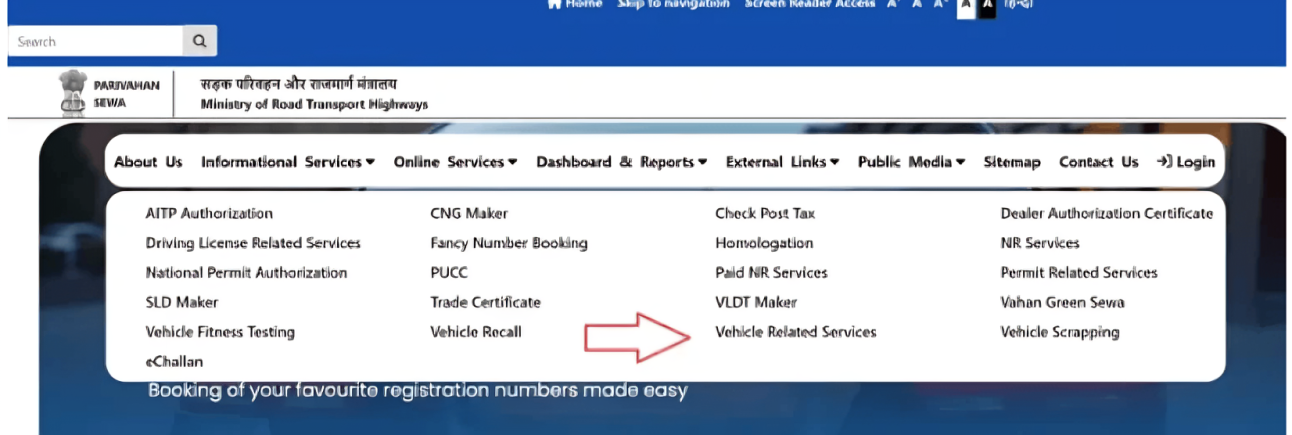
- Choose your State and RTO, then click Proceed.
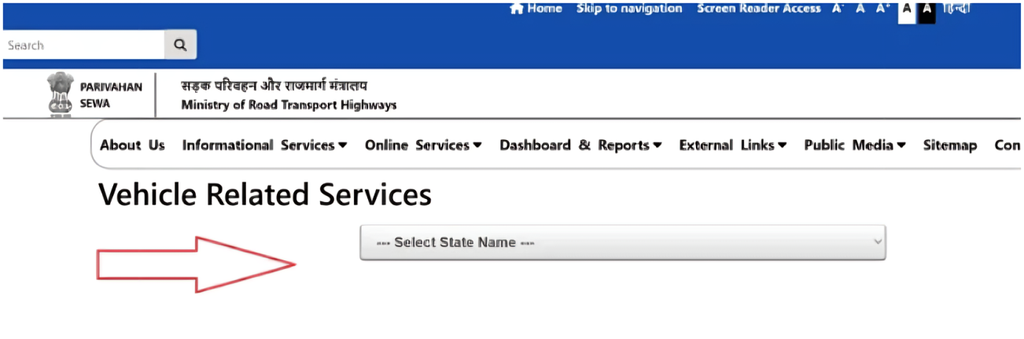
- In the main menu, go to Services > Additional Services.
- Select Know Your Vehicle Details.
- Enter the vehicle’s registration number, chassis number, and engine number.
- Click Verify Details.
Once verified, the full vehicle information will display on your screen, which you can also print out if needed.
What Information You Can Find
| Vehicle Detail | Description |
|---|---|
| Vehicle Registration Date | The official date the vehicle was registered with the RTO. |
| Chassis Number | The unique code stamped onto the vehicle’s frame. |
| Engine Number | The distinct identification number assigned to the engine. |
| Vehicle Class | The category of the vehicle, such as a two-wheeler, private car, or commercial truck. |
| Fuel Type | The type of fuel used, such as petrol, diesel, electric, etc. |
| Model & Manufacturer | The specific model name and the company that built the vehicle. |
| Fitness Validity Date | The expiration date of the vehicle’s legal fitness certificate. |
| PUC Certificate Number | The unique tracking number for the vehicle’s emission compliance certificate. |
| Motor Vehicle Tax Validity | The date up to which the vehicle tax has been paid. |
| Insurance Details | The insurance policy status and coverage details for the vehicle. |
| Emission Standard | The environmental standard the vehicle meets, such as BS-IV or BS-VI. |
| RC Status | The current status of the Registration Certificate, such as Active or Expired. |
Note: Accessing official vehicle records, owner details, or driving licence information in India is fast and straightforward. Beyond the web portal, you can also use the mParivahan mobile app or the dedicated SMS service to instantly retrieve accurate, government-verified details.
RC Print (Form 23)
Here is a clean, natural rewrite of the instructions:
To check and download your vehicle documents, follow these steps:
- Visit the official Parivahan website at https://parivahan.gov.in/.
- Hover over the Online Services tab in the main menu and select Vehicle Related Services.
- Choose your State from the drop-down list.
- Select your local RTO (or enter your vehicle registration number) and click Proceed.
- Click on the Download Document menu option.
- Select RC Print (Form 23) from the list.
- Enter your Vehicle Registration Number, Chassis Number, and Engine Number, then click Verify.
Once your details are verified, your official vehicle information and document will appear on the screen, ready to view or download.
Vehicle Registration Number Details in India
Every vehicle registered in India carries a unique Registration Number (commonly seen on number plates). This alphanumeric code isn’t random—it follows a structured format that reveals exactly where the vehicle was registered down to the local district level.
While a full registration number typically consists of four distinct sections, here is a breakdown of how the first two parts work:
State or Union Territory Code (First 2 Letters)
The first two letters identify the specific State or Union Territory (UT) where the vehicle is officially registered. Every state and UT in India is assigned a distinct two-letter postal code.
How it works:
- It acts as the broadest geographic identifier on the number plate.
- Vehicles registered under defense, diplomats, or the “BH” (Bharat) series follow unique national formats, but all standard private and commercial vehicles start with this state tag.
Examples:
- MH – Maharashtra
- DL – Delhi
- UP – Uttar Pradesh
- KA – Karnataka
- TN – Tamil Nadu
- GJ – Gujarat
RTO Code (Next 2 Digits)
Immediately following the state letters are two digits that identify the exact Regional Transport Office (RTO) that processed the vehicle’s registration.
How it works:
- States are divided into administrative transport districts, and large cities often have multiple RTOs divided by zone (North, South, East, West).
- These two digits allow law enforcement, insurance providers, and buyers to pinpoint the exact city, town, or sub-division where the vehicle was originally cataloged.
Examples:
- MH 01 – Mumbai Central (Maharashtra)
- DL 10 – West Delhi (Delhi)
- UP 32 – Lucknow (Uttar Pradesh)
- KA 03 – Bengaluru East (Karnataka)
A Quick Look at the Remaining Parts
To give you the complete picture, a standard Indian number plate finishes with two additional components:
- Part 3: The Unique Series / Running Code (1–3 Letters): A sequence (like
A,AB, orCZ) used by the RTO once the previous set of numbers from 0001 to 9999 is exhausted. Certain letters are reserved for specific vehicle classes (e.g., commercial vs. private). - Part 4: The Unique Identification Number (4 Digits): A distinct number assigned to your specific vehicle, ranging from
0001to9999. Special or VIP numbers (like0001or7777) are auctioned through this section.
Full Example: In the number MH 01 AB 1234:
- MH: Registered in Maharashtra
- 01: Issued by the Mumbai Central RTO
- AB: From the “AB” registration series
- 1234: Unique 4-digit vehicle number
Fancy Number Open Series Status
A fancy number (often called a VIP number) is a custom vehicle registration number chosen for its uniqueness, aesthetic appeal, ease of recall, or lucky significance. Rather than accepting a standard, system-generated number from the RTO, vehicle owners can bid on or purchase distinct number combinations such as 0001, 1111, 7777, 9999, or 0786.
In India, these VIP numbers are officially allocated and managed online by the Ministry of Road Transport and Highways (MoRTH) through the Parivahan Sewa portal.
How to Apply for a Fancy Number
The entire booking and auction process is managed digitally. Here is how to apply:
- Visit the Portal: Go to the official Parivahan Fancy Number website (
fancy.parivahan.gov.in). - Create an Account: Register yourself as a Public User to create login credentials.
- Select Location: Choose your State and local RTO from the system.
- Browse Numbers: Search the live database to check the availability of your preferred fancy number.
- Pay Registration Fee: Reserve the number by paying the non-refundable registration fee for that category.
- Participate in the E-Auction: If multiple people apply for the same number, enter the online bidding process.
- Complete Final Payment: If you win the bid, clear the remaining amount within the specified deadline.
- Assign to Vehicle: Use the official allotment letter to assign the VIP number to your new vehicle during registration at your RTO.
Cost Structure & Price Breakdown
Fancy numbers are grouped into pricing tiers based on rarity and demand. If more than one buyer applies for a specific number, the base price acts as the starting bid for an e-auction, driving the final cost higher.
| Number Category | Examples | Typical Base Price Range |
| Super Elite | 0001 | ₹5 Lakh+ (often goes much higher in competitive bidding) |
| Single-Digit | 0002 to 0009 | ₹3 Lakh – ₹5 Lakh |
| Repeated / Quad Digits | 1111, 7777, 9999 | ₹1 Lakh – ₹3 Lakh |
| Semi-Fancy / Patterns | 1234, 1212, 0055 | ₹50,000 – ₹1 Lakh |
Note: Base reserve prices vary slightly from state to state depending on local motor vehicle rules. The final price depends entirely on public demand during the live online auction.
Unique Vehicle Registration Number (Serial Number)
The final portion of a vehicle registration number consists of a running series letter code and a four-digit serial number. Working together, these two elements ensure that no two vehicles registered under the same RTO ever share the same plate number.
Here is a breakdown of how these components function:
The Four-Digit Serial Number (1234)
Every RTO issues sequential registration numbers to vehicles in the exact order they are registered.
- Format: Always ranges from
0001to9999. - Sequential Issuance: The first vehicle in a new series receives
0001, the second gets0002, and so on, continuing sequentially up to9999. - Purpose: Provides the primary unique numerical identity for the vehicle within its specific series.
The Series Alphabet Code (AB)
Because an RTO can only issue 9,999 numbers in a single numerical sequence, letters are added before the four digits to expand the available combinations.
- How it works: An RTO starts with no letters (e.g.,
0001to9999), then moves to single-letter series (A,B,C…), and eventually to two-letter series (AA,AB,AC…). - Resetting the Loop: Once a series reaches
9999(e.g.,MH 01 AB 9999), the numerical counter resets back to0001under the next alphabet series (MH 01 AC 0001). - Vehicle Class Variations: Many states reserve specific letters for vehicle types—for instance, using
Cfor commercial vehicles,Pfor buses, orSfor two-wheelers.
Full Number Breakdown: MH 01 AB 1234
| Code Component | Represents | Meaning |
| MH | State Code | Registered in Maharashtra |
| 01 | RTO Code | Issued by Mumbai Central RTO |
| AB | Series Alphabet Code | The “AB” running sequence category |
| 1234 | Serial Number | The 1,234th vehicle registered in the AB series |
Common State Codes for Indian States and Union Territories
In India, every state and Union Territory is assigned a distinct two-letter code defined by the Ministry of Road Transport and Highways (MoRTH). These codes form the prefix of every vehicle number plate, identifying the regional administrative origin of the registration.
Below is the complete reference list of vehicle registration state codes across all 28 States and 8 Union Territories:
Indian States
| State | Code |
| Andhra Pradesh | AP |
| Arunachal Pradesh | AR |
| Assam | AS |
| Bihar | BR |
| Chhattisgarh | CG |
| Goa | GA |
| Gujarat | GJ |
| Haryana | HR |
| Himachal Pradesh | HP |
| Jharkhand | JH |
| Karnataka | KA |
| Kerala | KL |
| Madhya Pradesh | MP |
| Maharashtra | MH |
| Manipur | MN |
| Meghalaya | ML |
| Mizoram | MZ |
| Nagaland | NL |
| Odisha | OD |
| Punjab | PB |
| Rajasthan | RJ |
| Sikkim | SK |
| Tamil Nadu | TN |
| Telangana | TS |
| Tripura | TR |
| Uttar Pradesh | UP |
| Uttarakhand | UK |
| West Bengal | WB |
Union Territories
| Union Territory | Code |
| Andaman and Nicobar Islands | AN |
| Chandigarh | CH |
| Dadra and Nagar Haveli, Daman and Diu | DD |
| Delhi | DL |
| Jammu and Kashmir | JK |
| Ladakh | LA |
| Lakshadweep | LD |
| Puducherry | PY |
Special Prefix Note: In addition to state/UT codes, India utilizes the BH (Bharat Series) prefix for nationwide registrations, allowing defense personnel, government employees, and private employees working across multiple states to relocate without re-registering their vehicles in each new state.
Common State Codes for Indian States and Union Territories
What should I do if my RC details are incorrect?
Contact your local RTO directly with your vehicle registration number and supporting official documents, or submit a correction request online through the Parivahan Portal under vehicle-related services.
How can I check RC details without the chassis or engine number?
You can check basic RC details using just your vehicle registration number through the mParivahan app, the official Parivahan website, or by sending an SMS in the format VAHAN <Vehicle Number> to 07738299899.
How do I update RC details after an ownership transfer?
Apply online via the Parivahan portal under Vehicle Related Services (select Transfer of Ownership), or visit your local RTO with the signed transfer forms (Forms 29 & 30), buyer and seller identity proofs, valid insurance, and the original RC.
Is there a fee to check RC details online?
No, searching and viewing RC details online is completely free. However, official service requests—such as downloading a duplicate RC, updating details, or transferring ownership—incur standard administrative fees.
Can I check RC details for a vehicle registered in another state?
Yes. The Parivahan portal connects to the national VAHAN database, allowing you to search and view RC information for any registered vehicle across India regardless of which state or RTO issued it.